Flutterの公式リポジトリに2文字だけコミットした話

先日Flutterの公式GitHubリポジトリに僕が作成したPRがマージされました。たった差分2文字だけですが、いつもお世話になっているフレームワークに少しでも貢献できたことはやはり嬉しいです🚀
実際のPR
内容はpackages/flutter/lib/src/material/text_theme.dartのコードコメント中の2104を2014に変更したというものでした。Flutterではmaterial designの2014年モデル(?)と2018年モデルに準拠したスタイルをテキストテーマとして提供しているようなのですが(正直よくわかっていない)、ドキュメントを読んでいて間違いに気づいたので修正したという感じです。
(まだstableには反映されていないので、早く反映されてほしい!)
PRを送る前の準備
PRを送る前に準備したこととしては、似たようなPRがないかを探してそれを参考にしました。それだけです(あとは、OpenなPRで似たようなものがないか探したかも)。
GitHubのPR検索から「fix typo」などで検索したところIssueを作成せずに直にPRを送っている例が見つかったので、そのPRを真似してタイトルと本文を考えました。今回の場合はコードコメントの修正のみだったので、テストが通るかどうかを確認したりスクリーンショットを添付したりする必要もなく、すんなり作成でき、次の日にはマージされました。
チャンスがあればPRを出すべき
僕は普段オープンソースにコミットすることはほぼありませんが、過去に数回だけPRを送ったことがあったのでスムーズにいきました。精神的なハードルが下がるのも大きいですが、大体どのリポジトリも手順は似ているので、一度PRがマージされるところまでいければ他でもその経験が流用できます。
こういった経験は一度すると次以降のハードルは結構下がるので、チャンスがあればぜひやってみることをおすすめします。
最低限のDjangoアプリ自動テスト
テストは不安を退屈に変える賢者の石だ。 ストレスを感じれば感じるほど、頻繁にテストを走らせるようになる。テストをすぐに走らせれば、ミスをしでかす確率が減っている実感が得られ、結果的にストレスが減っていく。
私たちは、完璧を求めているのではない。すべてのものをコードとテスト両方の視点から捉えることによって欠陥を減らし、 自信を持って前に進めるようになろうと考えているのだ。
ーーー「テスト駆動開発」より引用ーーー
複数人開発でテストコードがなくて困った
最近「スタマチ」の開発中、Aさんが書いたサーバーサイド(Django)のコードをBさんやCさんがフロントエンド(Flutter)から使用しようとしたとき、サーバーサイド側のコードにミスがありデバッグに非常に手間取ったということがありました。
もし、サーバーサイドでテストが書かれていたら、どうだったでしょうか?以下のことができたと思います。
- Aさんはテストでミスを事前に発見することができた
- BさんとCさんはテストを読むことでAPIの使い方を正しく知る事ができた
あるエンドポイントに対してのテストコードを書くことは、
- 品質の担保
- 手動デバッグの手間の削減
- フロントエンドエンジニアのためのわかりやすいドキュメント
の3つの意味で重要だと思っています。
特にフロントエンドエンジニアは、
- エンドポイントにどのようなHTTPリクエストを送ればどのようなレスポンスが返ってくるかだけが分かればよい
- その内部が正しく動いているかどうかまでは気にしたくない
と考えると思います。
テストコードを書くことで、1を明示し、2を担保することができます。
Django(DRF)で最小限のテストを書いてみる
今回はDjango REST Framework で作った APIサーバーに対するテストを書いてみます。
最小限性
具体的には、reportという名前のユーザ通報機能用のアプリケーションのcreateメソッド(REST FrameworkのModelViewSetを継承)に対してのテストを書きます。
views.py
from rest_framework import viewsets
from rest_framework.response import Response
from rest_framework.permissions import IsAuthenticated

from .models import Report
from .serializers import ReportSerializer


class ReportViewSet(viewsets.ModelViewSet):
    queryset = Report.objects.all()
    serializer_class = ReportSerializer
    permission_classes = [IsAuthenticated]

    def create(self, request, *args, **kwargs):
      # 省略
      return Response({'message': '通報が完了しました。'}, status=201)
tests.py
from django.urls import reverse
from rest_framework import status
from rest_framework.test import APITestCase
from .models import Report
from account.tests import *


class ReportTests(APITestCase):
    def test_create_report(self):
        reporting_user = create_user('test1', 'xxx@xxx.com', 'xxx')
        reported_user = create_user('test2', 'yyy@yyy.com', 'yyy')

        url = reverse('report-list')
        data = {'reporting_user_id': reporting_user.id,
                'reported_user_id': reported_user.id,
                'content': 'test'
                }

        self.client.login(username='test1', password='xxx')
        response = self.client.post(url, data, format='json')
        self.assertEqual(response.status_code, status.HTTP_201_CREATED)
        self.assertEqual(response.data, {'message': '通報が完了しました。'})
このようにテストを書くことで、フロントエンドエンジニア側から見て、先ほど挙げた二つの要素を満たすことができます。
- エンドポイントにどのようなHTTPリクエストを送ればどのようなレスポンスが返ってくるかだけが分かればよい(テストを読めば分かる。)
- その内部が正しく動いているかどうかまでは気にしたくない(テストが通っていれば、正しく動いている。)
また、 テストが通っていることを確認しておけば、サーバーサイドエンジニアは「自信を持って」コードをフロントエンドエンジニアに渡すことができます。
テストの実行
$ python manage.py test
Creating test database for alias 'default'...
System check identified no issues (0 silenced).
.
----------------------------------------------------------------------
Ran 1 test in 0.410s

OK
Destroying test database for alias 'default'...
これでテストの追加は完了です。
テストが失敗する例
これで、例えば views.py で201ではなく200を返すように書き換えた場合、以下のようにテストが失敗します。
Creating test database for alias 'default'...
System check identified no issues (0 silenced).
F
======================================================================
FAIL: test_create_report (report.tests.ReportTests)
----------------------------------------------------------------------
Traceback (most recent call last):
  File "/xxx/report/tests.py", line 40, in test_create_report
    self.assertEqual(response.status_code, status.HTTP_201_CREATED)
AssertionError: 200 != 201

----------------------------------------------------------------------
Ran 1 test in 0.411s

FAILED (failures=1)
Destroying test database for alias 'default'...
参考
DRFのテストについてのドキュメント https://www.django-rest-framework.org/api-guide/testing/
reverseに対応するurl名がわからなかったので、こちらを調べました https://www.django-rest-framework.org/api-guide/routers/#simplerouter
例えば、accounts-list で GET(list) と POST(create) の両方にあたります。これにハマりました
良いコードを書くために普段気をつけているパターン集
はじめに
この記事では、自分が普段コードを書く際に気をつけていることの中から、「良いコードを書くためのパターン」を説明していきます。今日から早速使えるようなものに絞ったつもりです。
ガード節による早期return
ガード節は、主にエラーなどの異常を受け取る可能性がある場合、 正常系の処理の手前で例外を発生させたり、returnしたりする節のこと です。一般に例外的な場合にはコードブロックが小さくなるので、先に例外を発生させたりreturnすることでその後の箇所でそれらを意識しなくて良くなり、よりコードがよみやすくなります。
StreamBuilder(stream: stream, builder: (context, snapshot){

  // ガード節
  if(snapshot.hasError){
    return Text("エラーです");
  }

  // 正常系
  if(!snapshot.hasData){
    rerurn CircularProgressIndicator(); // データが流れてくるまではインジケータを表示
  }else{
    return Text("正常に ${snapshot.data} を受け取りました");
  }
});
また、if elseとの使い分けとしては、ifもelseも正常な条件の場合はif elseを使い、例外的な条件を含む場合はガード節を使います
宣言的に書く
以下のようなListがあるとします。
List<int> collection = new List<int> { 1, 2, 3, 4, 5 };
このcollectionから、奇数だけを取り出した新しいListを作りたいとします。
命令的に書く場合、以下のようになります
List<int> results = new List<int>();
foreach(var num in collection)
{
    if (num % 2 != 0)
          results.add(num);
}
宣言的に書く場合、以下のようになります
var results = collection.where( num => num % 2 != 0);
慣れの問題もありますが、命令的に書くよりも宣言的に書いた方が実行結果がわかりやすいです。命令的に書くと、命令を追わないと結果がわからない場合が多いです。 命令的に書く場合、「命令の結果こうなる」ということになりますが、宣言的に書く場合、「こうなるようにしてほしい」という感じになります。 「結論から話した方がわかりやすい」という話と近いような、近くないような…?
クラス
できるだけprivateフィールド・メソッドを使う
クラス内からしか使われないフィールド・メソッドはprivateで宣言し、クラス外から使えないようにしましょう。これをすることで間違ってクラス外から使ってしまうことを防ぐことができますし、 クラス外から使われる可能性を考える必要がなくなり、コードがより読みやすく・デバッグしやすくなります。 以下は、広告配信のAdmobを使う際に、AndroidとiOSでidを使い分けて初期化するコードです。
注:Dartでは、_(アンダースコア)をつけることで private を表します
import 'dart:io';

import 'package:firebase_admob/firebase_admob.dart';

class AdMobService{
  void init() {
    FirebaseAdMob.instance.initialize(appId: _appId());
  }

  String _appId() {
    if (Platform.isAndroid) {
      return 'ca-app-pub-yyyy';
    } else if (Platform.isIOS) {
      return 'ca-app-pub-xxxx';
    } else {
      return '';
    }
  }
}
接合部をつくる
接合部とは、「レガシーコード改善ガイド」に出てくる言葉で、ある処理の中身を変更せずに処理の振る舞いを変えられる部分のことです。例を見てもらった方がわかりやすいと思います。
接合部なし
void saveArticle(Article article){
  final api = ArticleApi();
  api.save(article);
}
接合部あり
void saveArticle(Article article, Api api){
  api.save(article);
}
saveArticle(article, ArticleApi);
// こんな感じでも使える
// saveArticle(article, testApi);
あるいは、
class Repository{
  Repository({@required this.api});
  final Api api;

  void saveArticle(Article article){
    api.save(article);
  }
}
final repository = Repository(api: TestApi());
repository.saveArticle(articlei);
これの嬉しい点は、 処理の中身を書き換えなくとも、引数やDIコンテナなどで渡す値を変えることで振る舞いを変えられることです。これにより、モックオブジェクトを挿入しやすくなったり、別の種類の振る舞いに切り替えたりしやすくなります。 また、処理の中身を書き換えなくて良いのでより安全です。
computed propertyの活用
クラス内に関係する処理が集中し、同じコードが色々なところに散らばることを防ぐことができます。いわゆる Don't repeat yourself に従ったコードになるわけですね。
class Item{
  int price;

  String priceWithUnit(){
    return '$price円';
  }
}
その他
できるだけreadonlyを使う
readonlyを活用することで、意図せぬタイミングで変数の値が書き換えられることを防ぐことができます。要は変更されるべきでない変数には定数 or 不変宣言をすべきということですね。
定数を直打ちせず、変数を使って名前をつける
final productionApiUrl = "https://production.com/api";
final developmentApiUrl = "http://localhost:3000/api";
定数を直打ちせず、名前をつけていると意味や用途がわかりやすくなります。
また、変数として定義しておくことで、他の場所でも同じ定数を使いたい時にタイプミスを気にせず安全に使いまわせるので便利です。
とはいえ、全ての定数を変数にしようとすると大変なので、
- 値だけでは意味がわかりにくいもの
- 複数の箇所で使い回すもの
を変数にすると良いと思います。
空白行で段落を作る
空白行でコードに段落を作ることで、意味の境目をわかりやすくして読みやすくなります。
Linter・Formatterを使う
Linterによる静的チェック、Formatterによる自動フォーマットでコードをより確実に綺麗な状態に保ちます。
終わりに
その他、SOLID原則やアーキテクチャも気にしていたりしますが、ここでは典型的なパターンのみを列挙してみました。 まだまだ勉強中なので、もっといろんな点に注意してコードが書けるようになっていきたいですね。
参考
Clean Architecture・DDDをもとにしたFlutterアプリのモジュール分割&命名法
DDDの戦術的設計とは、DDD(ドメイン駆動設計)という設計手法における具体的な実装の方法論を指します。
これは、レイヤー分けの方法論で、例えば以下のようになります。
- アプリケーション固有のロジック: XXX、XXXService
- 永続化(DBなど)に関するコード: Repository
- アプリケーション固有のロジックを組み立てる役目: ApplicationService、UseCase
- UI
(アプリケーション固有のロジックに関しては、Entity、ValueObjectというパターンを使うことでXXXクラスを作るという形になります)
これらは、アプリケーション全体の構成を把握するために便利でもあります。この記事では、上記をさらに拡張して、以下のようにしてみます。タイトルは「Flutterアプリの」としましたが、Flutterアプリ以外でも同じようなものかと思います。
- ドメイン(ある分野特有の)ロジック: XXX、XXXService
- webAPIとの通信を行う: Api、ApiClient、DAO(Data Access Object)
- UIとUseCaseへの橋渡し役: Controller、Notifier、BLoC
- 永続化(DBなど)に関するコード: Repository
- ドメインロジックを組み合わせて一連の流れを作る役目: ApplicationService、UseCase
- UI: View、Widget、Page、Dialogなど
- DI: Provider
これに似たクリーンアーキテクチャでも、以下のような図が出てきます。
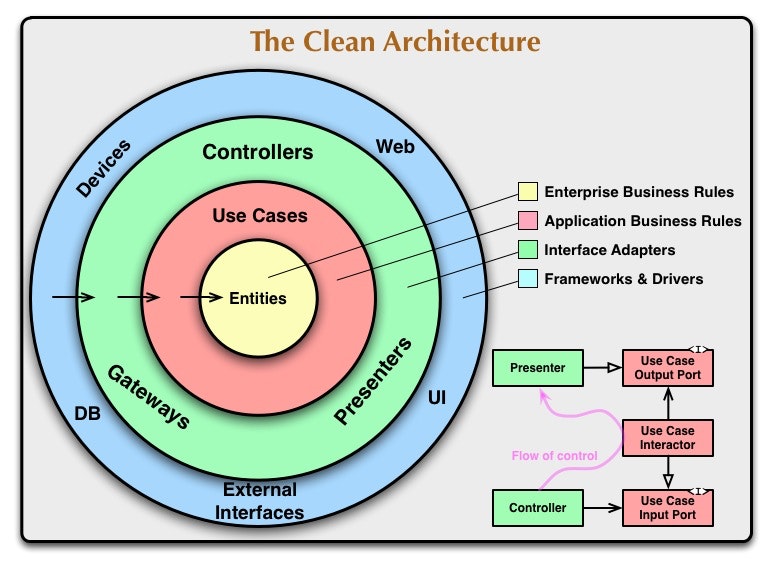
さて、一般的な言葉だけでは分かりづらいと思いますので、実際の例を示します。Flutterの人ならよく見たことのあるCartアプリを例にします。以下のような設定です。
- ドメインロジック: Item、Cart、CartService
- 複数のクラスを組み合わせたロジック: Facade
- webAPIとの通信を行う: ItemAPI、CartAPIClient
- UIとUseCaseへの橋渡し役: CartController、CartNotifier、CartBLoC
- 永続化(DBなど)に関するコード: CartRepository、ItemRepository
- ドメインロジックを組み合わせて一連の流れを作る役目: CartApplicationService、ItemUseCase
- UI: CartView、CartPage、AddToCartDialog
- DI: CartProvider
NotifierやProviderという言葉は、Flutter開発者ならよく目にしますよね。
これを図にすると、以下のようになります。
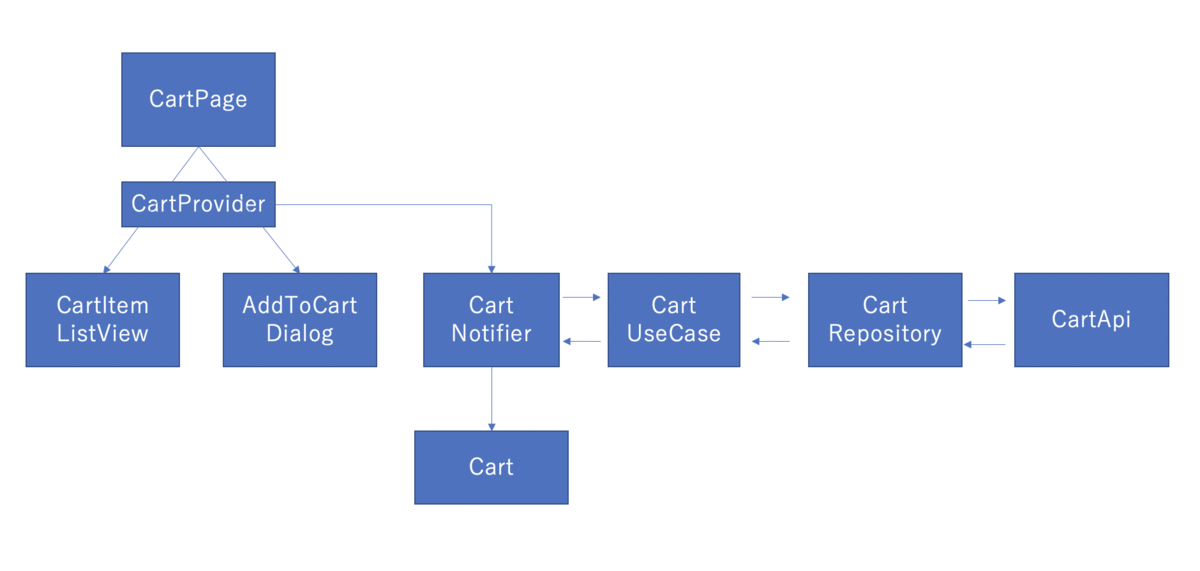
この時点で、これらを組み合わせてアプリを作っていくことが、なんとなくイメージできるのではないでしょうか?この記事の読者の皆様のモジュール分割、命名の際の参考になれば嬉しいです。
次回「実装編」に続くかもしれません。
Flutterアプリの主流な状態管理パターンと導入事例まとめ(2020年版)
- はじめに
- 状態管理パターンとは?
- Flutterの主流な状態管理パターン
- どれを選ぶべき?
- パターン1. StatefulWidget
- パターン2. InheritedWidget / InheritedModel
- パターン3. ChangeNotifier/ValueNotifier + Provider
- パターン4. BLoC + Provider
- パターン5. state_notifier + freezed + Provider
- 新パターン. Riverpod + ?
- アーキテクチャパターン系
- Redux
- mobX
- 過去に使われたパターン
- 実装比較用
はじめに
Flutterアプリを作る際、状態管理の方法/設計/アーキテクチャは必ず気になるポイントだと思います。この記事では2020年6月現在で主流とされているパターンと実際の導入事例を説明します。
この記事では、詳しい話は省略して概要のみを説明します。代わりにオススメの解説記事のリンクを載せてありますので、詳しい話はそちらから学ぶことができるようになっております。
状態管理パターンとは?
状態管理パターンとはなんなのか、という話ですが、単純にいうと以下の2つのことをうまくやるためのパターンです。
- アプリの状態を持つ変数を1つまたは2つ以上の箇所(クラス)で使えるようにする
- 変数の変更に応じて、UIを更新(リビルド)する
状態管理とは、基本的にはこの2つのことだと思えば良いと思います。この2つをうまくやるスキルを身につけることで、どんなアプリに対しても開発効率を大きく改善できると思っています。
Flutterの主流な状態管理パターン
この記事で紹介する状態管理パターンは以下です。
- StatefulWidget
- InheritedWidget / InheritedModel
- ChangeNotifier/ValueNotifier + Provider
- BLoC + Provider
- state_notifier + freezed + Provider
- ? + Riverpod
- Redux
- mobX
どれを選ぶべき?
結論: ChangeNotifier + Provider が一番無難
どの状態管理手法を選ぶべきか、迷いますよね・・。そこで、最近指針となるようなツイートを発見したのでご紹介します。
Flutter だと以下のいずれかが定番になりつつあり、
— mono (@_mono) 2019年11月29日
- InheritedWidget/Listenableに寄せる(≒provider+ChangeNotifierなど)
- Streamに寄せる(≒BLoC)
その奥のモデル層は好きに組めば良いし、どうしても何かで縛りたい場合はreduxパッケージとか使う、という感じで特に悩ましい点無い気がする🤔
1年ぶりの私感(どのパターンが良いか聞かれたらこんな感じで答える):
— mono (@_mono) 2020年5月26日
- provider + ChangeNotifier: 最も無難で、適切に扱えば大きめのアプリでもこれメインで特に問題はない
- BLoCやそれに準ずるStreamベースの書き方: 複雑めな要件かつRxとか肌に合うなら良いのでは https://t.co/ebO8edj7yL
繰り返しますが、こちらで説明されている通り、 ChangeNotifier と Providerの組み合わせが一番無難なパターンと言えそうです。 ただし、今回この記事で紹介するパターンは、組み合わせが可能なものもありますし、混在が悪というわけではありませんので、ご注意ください。
ChangeNotifer + Providerに不安な点があるとすれば、package:providerが2019年5月のGoogle I/O以降にという比較的新しいパッケージであるためか、企業がリリースしているアプリでChangeNotifierをメインで使っている例をネット上で見つけることはできませんでした(パターン3にて後述)。しかし、これも後にご紹介しますが、時期的な問題で採用したBLoCをChangeNotifierに置き換えようという企業も実際にあるようですので、それほど大きな不安を抱く必要はないと思います。
2020/07/17 追記: 同じ方による、新しいライブラリRiverpod(まだ安定版ではないので注意)も含めた以下の投稿がありました。
Flutterの状態管理変遷私感
— mono (@_mono) 2020年7月15日
1. 2年前時点のscoped_modelやBLoC時点でそこそこ完成してた
2. BLoCのprovide手段を弊bloc_providerやproviderで補助すると扱いやすくなった
3. prividerが多機能化して、ChangeNotifierと組み合わせるとそれだけで済む感が出てきた
2020/07/17 追記2: Flutter公式からもpackage:providerが推奨となりました。
https://flutter.dev/docs/development/data-and-backend/state-mgmt/options#provider
2020/8/29 追記3: こちらにもChangeNotifier + Riverpod構成のテンプレートがあります。
では、前置きはこのあたりにして、各パターンについて説明していきます。
パターン1. StatefulWidget
StatefulWidgetは、基本的にはある状態変数fooを1つのWidgetだけが変更し、その変更を子Widgetに伝えたい場合に使います。
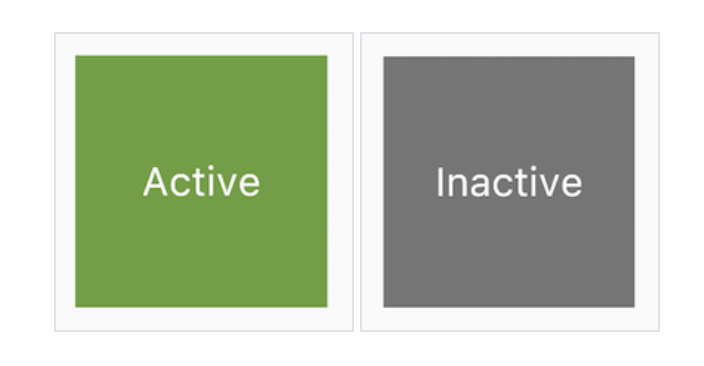
例として、Adding interactivity to your Flutter app - Flutter よりコードと画像を引用します。
class TapboxA extends StatefulWidget {
  TapboxA({Key key}) : super(key: key);

  @override
  _TapboxAState createState() => _TapboxAState();
}

class _TapboxAState extends State<TapboxA> {
  bool _active = false;

  void _handleTap() {
    setState(() {
      _active = !_active;
    });
  }

  Widget build(BuildContext context) {
    return GestureDetector(
      onTap: _handleTap,
      child: Container(
        child: Center(
          child: Text(
            _active ? 'Active' : 'Inactive',
            style: TextStyle(fontSize: 32.0, color: Colors.white),
          ),
        ),
        width: 200.0,
        height: 200.0,
        decoration: BoxDecoration(
          color: _active ? Colors.lightGreen[700] : Colors.grey[600],
        ),
      ),
    );
  }
}
この例の場合、状態変数 _active を子WidgetであるTextとBoxDecorationで使い、_activeが変化するタイミングでsetState()を実行し、リビルドして状態を反映させます。
逆に、ある状態変数を2つ以上のWIdgetが変更したり、子Widgetで状態変数が変更されて親Widgetでその状態変数を利用するような場合は、package:provider + ChangeNotifier、あるいはpackage:provider + BLoCなどを使った方が管理しやすいです。
パターン2. InheritedWidget / InheritedModel
InheritedWidgetはわかりにくくコード量も無駄に多くなるということで、package:providerが登場しました。現状、package:providerでできるような用途の場合、package:providerを使いましょう。 その方がコードは劇的に短くかけてわかりやすくなります。そのため、 どうしてもpackage:providerでできないようなことをしたいときのみInheritedWidgetを使うべき だと思います。
そのため、ここでの説明も最低限にします。
InheritedWidgetは、状態変数をWidget間で共有する際に使うWidgetです。InheritedWidgetは状態変数と子Widgetを持ちます。

InheritedWidgetを使うと、以下のことができます。
- 複数の子Widgetから状態変数を取得、変更できる
- その変更を検知して子Widgetを 部分的に(StatefulWidgetではできなかった) リビルドして変更を反映させることができる
- setState()のバケツリレーをせずに親Widgetをリビルドできる
もっと詳しく
以下の記事が詳しいです。 qiita.com
パターン3. ChangeNotifier/ValueNotifier + Provider
これもInheritedWidgetを使ったパターンと同じく、状態変数を複数Widget間で共有する際に使うパターン です。また、冒頭で述べた通り、Flutter開発をする大多数の方にお勧めできるパターンです。
providerパッケージに含まれるProvider.of()やConsumerなどを使うことで、Provider系モジュールにより注入した値の変更を検知し、Widgetをリビルドすることができます。このリビルドの際には状態変数に関わる部分だけを対象にすることができ、パフォーマンス面でも最適になりやすいです。
現在はFlutter公式ガイドでもリストの一番上で紹介されており、シンプルな場合にはこれを使うのが良いとされているのだと思います。とりあえず迷ったらこれ、と考えて良いと思います。
ChangeNotifierの作成
class Counter with ChangeNotifier {
  int _count = 0;
  int get count => _count;

  void increment() {
    _count++;
    notifyListeners();
  }
}
Provider(ChangeNotifierProvider)のchildにWidgetを設定
import 'package:flutter/material.dart';
import 'package:provider/provider.dart';

void main() {
  runApp(
    MultiProvider(
      providers: [
        ChangeNotifierProvider(create: (_) => Counter()),
      ],
      child: MyHomePage(),
    ),
  );
}
class MyHomePage extends StatelessWidget {
  const MyHomePage({Key key}) : super(key: key);

  @override
  Widget build(BuildContext context) {
    return MaterialApp(
      home: Scaffold(
        appBar: AppBar(
          title: const Text('Example'),
        ),
        body: Center(
          child: Column(
            mainAxisSize: MainAxisSize.min,
            mainAxisAlignment: MainAxisAlignment.center,
            children: <Widget>[
              const Text('You have pushed the button this many times:'),
              const Count(),
            ],
          ),
        ),
        floatingActionButton: FloatingActionButton(
          onPressed: () => context.read<Counter>().increment(),
          tooltip: 'Increment',
          child: const Icon(Icons.add),
        ),
      ),
    );
  }
}
class Count extends StatelessWidget {
  const Count({Key key}) : super(key: key);

  @override
  Widget build(BuildContext context) {
    return Text(
        '${context.watch<Counter>().count}',
        style: Theme.of(context).textTheme.headline4);
  }
}
導入事例
日本企業での導入事例はネット上では見つけられませんでしたが、既にリリース済みのアプリを後述のBLoCパターンからprovider+ChangeNotifierの実装に置き換えようとしているという記事がありました。
https://qiita.com/hukusuke1007/items/318875bb11c23572d46f
また、個人開発アプリでは導入事例がありました。この記事では局所的にRx(≒Streamの拡張ライブラリ)を使っているとも書かれています。 https://qiita.com/takashi-i/items/d364b4547db14d5c31de
以下の動画の12:10付近から、2019年5月当時のFlutterにおける状態管理の歴史について少し説明があります。
ここでは、それまで主流だったScopedModelとBLoCについて触れられており(BLoCは現在も主流の一つですが)、新しい方法として、providerパッケージが紹介されています。
もっと詳しく
providerは種類が多いのですが、この記事が網羅的でかつ情報も随時更新されていて新しいです。 qiita.com
Flutter公式サンプルとしてもproviderが採用されています。 flutter.dev
パターン4. BLoC + Provider
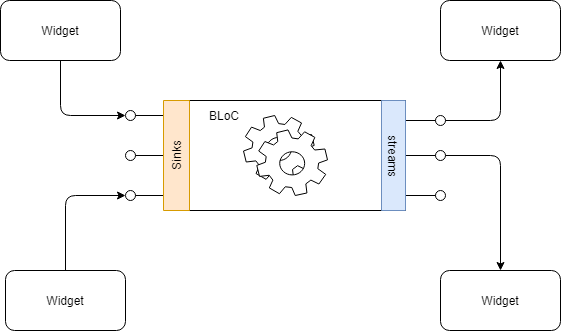
BLoCパターンは、簡単に言うとStream/Observableを入出力役として状態管理やロジックの実行を行うパターンです。ChangeNotifierの場合は普通にメンバを直接取得/変更していましたが、それをStream経由に限定するのが大きな特徴 です。
参考図(リンク元より引用)
BLoCのメリット、デメリット
Streamを使った状態管理がしたい場合、現在でもBLoCパターンを使うのが一般的でしょう。StreamBuilderとの組み合わせにより、局所的なリビルドが簡単に行えます。インクリメンタルサーチのようなRxDartを使った方が書きやすい場合や、Firestoreのsnapshots系のメソッドなど、Stream系の値を返すライブラリを使う場合に相性が良いです。
一方で、BLoCの実装に必要なStream/RxDartの学習コストが高いことや、ChangeNotiferなどに比べてボイラープレートコードが多くなることがデメリットと言われています。
コード例
Stream/RxDart初心者のためのBLoC入門(Flutter) - Qiita より引用
import 'dart:async';

class CounterBloc {
  final _actionController = StreamController<void>();
  Sink<void> get increment => _actionController.sink;

  final _countController = StreamController<int>();
  Stream<int> get count => _countController.stream;

  int _count = 0;

  CounterBloc() {
    _actionController.stream.listen((_) {
      _count++;
      _countController.sink.add(_count);
    });
  }

  void dispose() {
    _actionController.close();
    _countController.close();
  }
}
main.dart
import 'package:counter_bloc/counter_bloc.dart';
import 'package:flutter/material.dart';
import 'package:provider/provider.dart';

void main() => runApp(MyApp());

class MyApp extends StatelessWidget {
  @override
  Widget build(BuildContext context) {
    return MaterialApp(
        title: 'Flutter Demo',
        theme: ThemeData(
          primarySwatch: Colors.blue,
        ),
        home: Provider<CounterBloc>(
          builder: (context) => CounterBloc(),
          dispose: (context, bloc) => bloc.dispose(),
          child: MyHomePage(title: 'Flutter Demo Home Page'),
        ));
  }
}


class MyHomePage extends StatelessWidget {
  MyHomePage({this.title});

  final String title;

  @override
  Widget build(BuildContext context) {
    final counterBloc = Provider.of<CounterBloc>(context);
    return Scaffold(
      appBar: AppBar(
        title: Text(title),
      ),
      body: Center(
        child: Column(
          mainAxisAlignment: MainAxisAlignment.center,
          children: <Widget>[
            Text(
              'You have pushed the button this many times:',
            ),
            StreamBuilder(
              initialData: 0,
              stream: counterBloc.count,
              builder: (context, snapshot) {
                return Text(
                  '${snapshot.data}',
                  style: Theme.of(context).textTheme.display1,
                );
              },
            )
          ],
        ),
      ),
      floatingActionButton: FloatingActionButton(
        onPressed: () {
          counterBloc.increment.add(null);
        },
        tooltip: 'Increment',
        child: Icon(Icons.add),
      ), // This trailing comma makes auto-formatting nicer for build methods.
    );
  }
}
導入事例
https://qiita.com/navitime_tech/items/21a6111b36b98cac3100
https://note.com/yamarkz/n/nd9716541d8ad
https://speakerdeck.com/yamarkz/division-plan-and-practical-example-in-bloc-pattern
flutter_blocとBLoC
package:flutter_blocは、event、stateなどの制約も同梱しており、blocの本来の制約よりもきつい制約が設定されたライブラリです。
flutter_blocはBLoCパターンの実装に必須なパッケージではありません。 それどころか、flutter_blocの制約が強いことを嫌うエンジニアをネット上で見かけることもあります。
しかし一方でより強い型付け/制約付けによりチーム開発でのコードの可読性や統一性を高める効果があるのだと思います。
BLoCの課題
Provider のススメ | Unselfish Meme
(一時、「まだBLoCで消耗してるの?」というタイトルでした。いつの間にか変わっていたのですね。[B! flutter] まだ BLoC で消耗してるの? | Unselfish Meme)
BLoCはスタンダードなパターンとして考えられていましたが、BLoCに含まれるStream/Rxという概念に馴染みがないエンジニアにとっては敷居が少し高く、シンプルな状態管理の場合にはBLoCパターンはオーバーなのではないかという意見も出始め、ちょうどそのころ package:provider が登場したことで、次で説明する「Provider + ChangeNotifier/ValueNotifier」パターンに流れる人も多く現れました。
(2019年のGoogle I/Oでも同様の内容が語られています)
Stream=BLoCではない
状態変数の管理にStreamを使うからといって、BLoCパターンを無理に使う必要はありません。Streamを使った状態管理パターンの一つとしてBLoCパターンがあるというだけです。
おまけ:BLoCの歴史
BLoCは、Google I/O 2018 で紹介されました。この際には、ScopedModelのminimal rebuildができないという欠点を補うという点でScopedModelに優っているとされていました。また、 このタイミングではInheritedWidgetを使った自前実装のCartProviderというWidgetを使って複数WidgetでのBLoCの共有を実現していました (動画では 23:40 付近で言及)。
youtu.be 23:11 付近
cubit
flutter_bloc | Flutter Package の軽量版パッケージとして、cubitというパッケージも公開され、海外のエンジニアに好評のようです。ただし、おそらくflutter_blocを使っていた人が軽量板を求めて移行している場合が多いと考えられますが、そうでない方でも使いやすいものになっているようです。
注:現在は packages:flutter_bloc に含まれるようになりました。
実際のコードは以下のようになっており、とてもシンプルです。
https://github.com/felangel/cubit より引用。
class CounterCubit extends Cubit<int> {
  CounterCubit() : super(0);

  void increment() => emit(state + 1);
  void decrement() => emit(state - 1);
}
利用側はこのようになります。以下のクラスやメソッドを用いてCubitを使います。
- CubitProvider
- context.cubit
() - CubitBuilder<CounterCubit, int>
https://pub.dev/documentation/flutter_cubit/latest/ より引用
class CubitCounter extends StatelessWidget {
  @override
  Widget build(BuildContext context) {
    return MaterialApp(
      home: CubitProvider(
        create: (_) => CounterCubit(),
        child: CounterPage(),
      ),
    );
  }
}

class CounterPage extends StatelessWidget {
  @override
  Widget build(BuildContext context) {
    return Scaffold(
      appBar: AppBar(title: const Text('Cubit Counter')),
      body: CubitBuilder<CounterCubit, int>(
        builder: (_, count) {
          return Center(
            child: Text('$count'),
          );
        },
      ),
      floatingActionButton: Column(
        crossAxisAlignment: CrossAxisAlignment.end,
        mainAxisAlignment: MainAxisAlignment.end,
        children: <Widget>[
          Padding(
            padding: const EdgeInsets.symmetric(vertical: 4.0),
            child: FloatingActionButton(
              child: const Icon(Icons.add),
              onPressed: context.cubit<CounterCubit>().increment,
            ),
          ),
・・・
Cubit
Cubit class - bloc library - Dart API
cubitは、FlutterのValueNotifierや後に紹介するpackage:state_notifierのStream版ともいえるかと思いますので、ValueNotifierやStateNotifier、ChangeNotifierを使っていて同じようにStreamを使いたいという場合は、選択肢に入ってくるかと思います。
(7/29日追記)一方で、package:riverpodの作者のremiさんも以下のような発言をしており、StateNotifierでもstreamを扱いやすくなるようです。こちらも注目ですね。
My weekend plan was to add an asStream/map/take/...
— Remi Rousselet (@remi_rousselet) 2020年7月25日
So... 🤷♂️
もっと詳しく
より詳しく知りたい方は、こちらの記事がオススメです。
パターン5. state_notifier + freezed + Provider
state_notifierは、ValueNotifier/ChangeNotifierに相当するパッケージです。ほとんどValueNotifierと同じです。
state_notifierを使うと、状態変数をimmutableに扱うことが強制されます。 StateNotiferstate = state.copyWith(count: count+1))。state.count +=1のような感じ)を変更するという形を取っています。
class Counter extends StateNotifier<int> {
  Counter(): super(0)

  void increment() {
    state++;
  }
}
state_notifierを使うと、現在の状態と新しい状態が変更後も両方存在することになる ため、履歴の管理やがしやすいです。そのため、「元に戻す」といった操作の実装が簡単になります。
一方、ChangeNotifierを使う場合、状態変数がクラスオブジェクトだった場合などに、参照をコピーして保存した履歴は最終的に全て同じものになってしまいます。state_notifierの場合、このようなことは起こりません。
また、 state_notifierを使うと、以下の例のようにStateとNotifierを自然と別々に取得できるようになるので、ChangeNotifierよりも明確に取得役(State)と更新役(Notifier)が分かれているのもポイントです。
      Text(
              context.select((MyState value) => value.count).toString(), // State
              style: Theme.of(context).textTheme.headline4,
            ),
          ],
        ),
      ),
      floatingActionButton: FloatingActionButton(
        onPressed: context.watch<MyStateNotifier>().increment, // Notifier
        tooltip: 'Increment',
        child: Icon(Icons.add),
      ),
state_notifierでは、状態変数を一つの値として持ちます。ChangeNotifierでは状態変数を複数もつことができますが、state_notifierではそれはできません。その不便さを解消するため、freezedライブラリをセットで使うことが多いです。
また、LocatorMixinによるDI(以下のread
class Counter extends StateNotifier<int> with LocatorMixin {
  Counter(): super(0)

  void increment() {
    state++;
    read<LocalStorage>().writeInt('count', state);
  }
}
また、notifieyListeners()を呼ぶ必要がなくなることや、ValueNotifierよりもパフォーマンス上の改善が行われています。(これはValueNotifierも同じですが)
例
flutter_state_notifier | Flutter Package より引用
import 'package:example/my_state_notifier.dart';
import 'package:flutter/material.dart';
import 'package:flutter_state_notifier/flutter_state_notifier.dart';
import 'package:provider/provider.dart';

// This is the default counter example reimplemented using StateNotifier + provider
// It will print in the console the counter whenever it changes
// The state change is also animated.

// The "print to console" feature is abstracted through a "Logger" class like
// we would do in production.

// This showcase how our custom MyStateNotifier does not depend on Flutter,
// but is still able to read providers and be used as usual in a Flutter app.

void main() {
  runApp(
    MultiProvider(
      providers: [
        Provider<Logger>(create: (_) => ConsoleLogger()),
        StateNotifierProvider<MyStateNotifier, MyState>(
          create: (_) => MyStateNotifier(),
          // Override MyState to make it animated
          builder: (context, child) {
            return TweenAnimationBuilder<MyState>(
              duration: const Duration(milliseconds: 500),
              tween: MyStateTween(end: context.watch<MyState>()),
              builder: (context, state, _) {
                return Provider.value(value: state, child: child);
              },
            );
          },
        ),
      ],
      child: MyApp(),
    ),
  );
}

/// A [MyStateTween].
///
/// This will apply an [IntTween] on [MyState.count].
class MyStateTween extends Tween<MyState> {
  MyStateTween({MyState begin, MyState end}) : super(begin: begin, end: end);

  @override
  MyState lerp(double t) {
    final countTween = IntTween(begin: begin.count, end: end.count);
    // Tween the count
    return MyState(
      countTween.lerp(t),
    );
  }
}

class MyApp extends StatelessWidget {
  @override
  Widget build(BuildContext context) {
    return const MaterialApp(
      title: 'Flutter Demo',
      home: MyHomePage(),
    );
  }
}

class MyHomePage extends StatelessWidget {
  const MyHomePage({Key key}) : super(key: key);

  @override
  Widget build(BuildContext context) {
    return Scaffold(
      appBar: AppBar(
        title: const Text('Counter example'),
      ),
      body: Center(
        child: Column(
          mainAxisAlignment: MainAxisAlignment.center,
          children: <Widget>[
            const Text(
              'You have pushed the button this many times:',
            ),
            Text(
              context.select((MyState value) => value.count).toString(),
              style: Theme.of(context).textTheme.headline4,
            ),
          ],
        ),
      ),
      floatingActionButton: FloatingActionButton(
        onPressed: context.watch<MyStateNotifier>().increment,
        tooltip: 'Increment',
        child: Icon(Icons.add),
      ),
    );
  }
}
もっと詳しく
2020/8/29 追記4:
新パターン. Riverpod + ?
また、package:providerの作者のRemiさんが、Riverpodという実験的プロジェクト(ライブラリ)を進行中(2020/6/24現在)のようです。
まだstable(安定版)ではないため、破壊的変更に注意してください。stableリリースまでは、package:providerを使う方が無難です。
package:providerとの比較
基本的にはpackage:providerと同じようなライブラリで、package:providerで使えていたProviderやChangeNotifierProvider、Consumerなどは今まで通り使えます。
それに加えたメリットとしては、以下が挙げられます。
- package:riverpodはFlutter非依存
- 実行時ではなくコンパイル時にエラーを出してくれる
- Computed、Family、AutoDisposeProviderなどの新機能
- hooks的な使い方も可能
まだ試行段階ということなので一般的に使われるのは先になりそうですが、個人的には従来のProvider + オプションでhooksにも対応している(package:hooks_riverpod)ことから、将来的にはproviderよりもRiverpodの方がより多くのユーザを取り込めそうかなと思っています。
ただし、Flutter公式はhooksを肯定的には捉えておらず、まずはpackage:flutter_riverpodの方を使う方が無難かと思います。
2020/8/29 追記3: こちらの記事でも、Providerとの比較が載っているのでぜひ参考にしてください。
もっと詳しく
以下の公式ドキュメントがわかりやすいので、気になった方はぜひ読んでみてください。
アーキテクチャパターン系
ここまでで挙げたパターンは、基本的にViewModelを活用したMVVMパターンの一部として使われることが多いかと思います。具体的には、Value/ChangeNotifier、BLoC、StateNotifier(とState)がViewModelとして用いられます(ViewはWidget)。
以下ではMVVM以外のアーキテクチャパターンを説明します。
Redux
Reduxは、「Single source of truth」、「State is read only」、「Changes are made with pure function」の3つの原則によってよりわかりやすく安全に状態変数を扱うためのアーキテクチャ です。以下の図のような要素・フローによってこれらの原則が実現されます(正確には、原則を守りやすくなるということだと思います)。また、Fluxに見られる「単一方向の状態変更フロー」も満たすことができます。
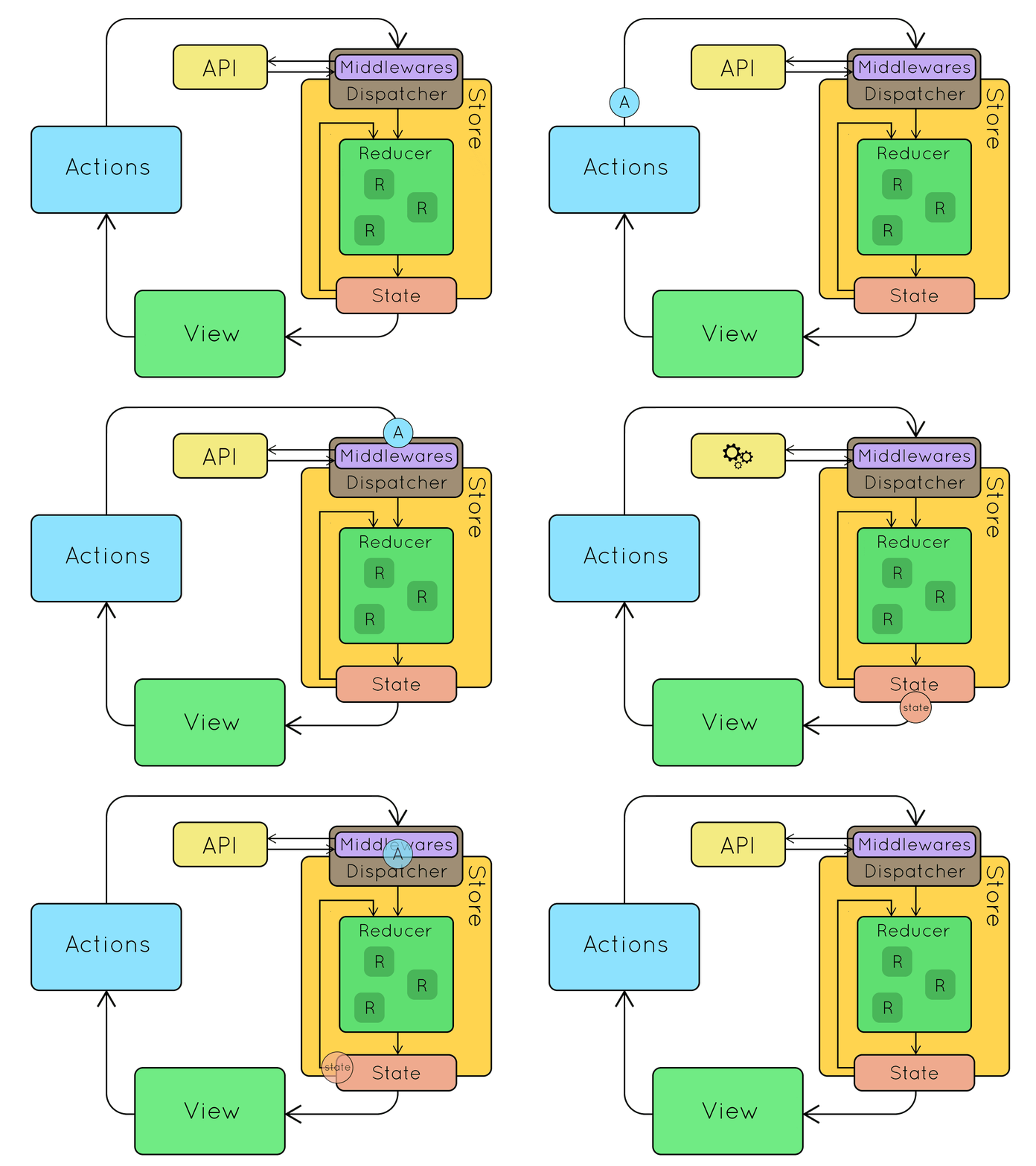
引用: Redux. From twitter hype to production
Reduxの利点(ChangeNotifierやBLoCと比較)
- 厳し目のルールのため、意図しない状態変数の変更が起こりにくい
- 書き方が統一されやすく、複数人開発でもコードがわかりやすい
- 「Single source of truth」により、状態変数がいろんな箇所に散らばるということがない
Reduxの欠点(ChangeNotifierやBLoCと比較)
- 学習コストが高い
- boiler plate(定型文)の量が多くなってしまう
導入事例
https://note.com/kitoko552/n/nd25e46daf2d4
もっと詳しく
Reduxのより詳しい解説は以下の記事をお読みください。
FlutterにおけるReduxは、以下のpackage:flutter_reduxを使うのが定番のようです。
List of state management approaches - Flutter
サンプル
以下にflutter_reduxに載っているサンプルコードを引用します。
import 'package:flutter/material.dart';
import 'package:flutter_redux/flutter_redux.dart';
import 'package:redux/redux.dart';

// One simple action: Increment
enum Actions { Increment }

// The reducer, which takes the previous count and increments it in response
// to an Increment action.
int counterReducer(int state, dynamic action) {
  if (action == Actions.Increment) {
    return state + 1;
  }

  return state;
}

void main() {
  // Create your store as a final variable in a base Widget. This works better
  // with Hot Reload than creating it directly in the `build` function.
  final store = new Store<int>(counterReducer, initialState: 0);

  runApp(new FlutterReduxApp(
    title: 'Flutter Redux Demo',
    store: store,
  ));
}

class FlutterReduxApp extends StatelessWidget {
  final Store<int> store;
  final String title;

  FlutterReduxApp({Key key, this.store, this.title}) : super(key: key);

  @override
  Widget build(BuildContext context) {
    // The StoreProvider should wrap your MaterialApp or WidgetsApp. This will
    // ensure all routes have access to the store.
    return new StoreProvider<int>(
      // Pass the store to the StoreProvider. Any ancestor `StoreConnector`
      // Widgets will find and use this value as the `Store`.
      store: store,
      child: new MaterialApp(
        theme: new ThemeData.dark(),
        title: title,
        home: new Scaffold(
          appBar: new AppBar(
            title: new Text(title),
          ),
          body: new Center(
            child: new Column(
              mainAxisAlignment: MainAxisAlignment.center,
              children: [
                new Text(
                  'You have pushed the button this many times:',
                ),
                // Connect the Store to a Text Widget that renders the current
                // count.
                //
                // We'll wrap the Text Widget in a `StoreConnector` Widget. The
                // `StoreConnector` will find the `Store` from the nearest
                // `StoreProvider` ancestor, convert it into a String of the
                // latest count, and pass that String  to the `builder` function
                // as the `count`.
                //
                // Every time the button is tapped, an action is dispatched and
                // run through the reducer. After the reducer updates the state,
                // the Widget will be automatically rebuilt with the latest
                // count. No need to manually manage subscriptions or Streams!
                new StoreConnector<int, String>(
                  converter: (store) => store.state.toString(),
                  builder: (context, count) {
                    return new Text(
                      count,
                      style: Theme.of(context).textTheme.display1,
                    );
                  },
                )
              ],
            ),
          ),
          // Connect the Store to a FloatingActionButton. In this case, we'll
          // use the Store to build a callback that with dispatch an Increment
          // Action.
          //
          // Then, we'll pass this callback to the button's `onPressed` handler.
          floatingActionButton: new StoreConnector<int, VoidCallback>(
            converter: (store) {
              // Return a `VoidCallback`, which is a fancy name for a function
              // with no parameters. It only dispatches an Increment action.
              return () => store.dispatch(Actions.Increment);
            },
            builder: (context, callback) {
              return new FloatingActionButton(
                // Attach the `callback` to the `onPressed` attribute
                onPressed: callback,
                tooltip: 'Increment',
                child: new Icon(Icons.add),
              );
            },
          ),
        ),
      ),
    );
  }
}
ちなみに、パッケージの最終更新日が2019/12 となっており、versionも0.6.0となっていることからあまり開発が活発ではないかのようにも思いましたが、本家のjs版Reduxも最終更新は2019/12だったことから、特にそういうわけではないようです。
Releases · reduxjs/redux · GitHub
mobX
Flutter公式の選択肢として、mobXというパターンも紹介されていますが、個人的に主流には感じられないため、今回は割愛します。以下の記事でわかりやすい説明がされておりますので、興味がある方は読んでみてください。Reduxに近いアーキテクチャのようです。
過去に使われたパターン
ScopedModel
ScopedModelは、InheritedWIdget + ChangeNotifierのようなパッケージです。
過去によく使われていたパッケージですが、package:providerの登場後はおそらくほぼ使われなくなりました。
package:provider は ScopedModelでしたかったことである「InheritedWidgetを使いやすくすること」を達成しつつ、より汎用性が高い(ScopedModelはInheritedWIdget + ChangeNotifierのような使い方しかできない)ことから、ScopedModelを使う理由がなくなったのだと思われます。
また、過去にはprovideパッケージというものも存在していましたが、providerパッケージの方が優れているということでproviderパッケージが本流となったようです。 https://ntaoo.hatenablog.com/entry/2019/05/12/141018
https://youtu.be/d_m5csmrf7I 19:34-
導入事例
実装比較用
こちらのGitHubリポジトリにいろんなパターンのサンプルプロジェクトがあるので、同じような構成のアプリでパターンを比較したいという方におすすめです。
REST、GraphQL、gRPCの使い方中心のまとめ
僕はRailsで初めてRESTでCRUD APIを作ったのですが、その後いろいろなバックエンドアプリを実装したり、他の方の記事や実装をみたり、チュートリアルをこなしたりするうちに GraphQL、gRPCというものもここ数年普通に使われるようになってきているということを知り、そろそろそれらを選択肢として考えた上で採用する必要がある ように感じています。
この記事は、REST、GraphQL、gRPCの3つのAPI設計手法(思想?)を使い方中心に調べたことのまとめです。
ちなみに、詳しくはこちらの記事が詳しそうです。このブログ記事を書く際にも一部参考にしました。逆に詳しすぎて読む気があまり起こりません。次に新しいサービスを作る際や、新しい構成を考える際に読もうと思っています。(OpenAPIがRESTにあたるようです)
REST
- HTTPメソッド(GET, POSTなど)とエンドポイント+リクエストボディ+αの組み合わせ
- サーバー側の実装
- 上記の組み合わせに応じてアクセスを受け取れるようにし、アクセスに対してレスポンスを返すように実装
- フロントエンド側の実装
- サーバ側の実装に対応するようにHTTPリクエストを送り、受け取れるように実装
RESTはrailsなどでおなじみという方は多いと思います。
railsを例にしたREST概念の説明についてはこちらがわかりやすそうです。
www.slideshare.net
GraphQL
参考:「GraphQL」徹底入門 ─ RESTとの比較、API・フロント双方の実装から学ぶ - エンジニアHub|若手Webエンジニアのキャリアを考える! など
- エンドポイント+クエリ
- エンドポイントは一つでも複数でも良い。リクエストボディに任意のクエリを指定することでそれに応じたレスポンスが返る。
- サーバー側の実装
- (一般に)単一のエンドポイントを用意。クエリに応じてレスポンスを返すように実装
- フロントエンド側の実装
- GET/POST + エンドポイント + クエリ とのセットを送り、返ってきたレスポンスを処理できるよう実装
- クエリは二種類に大別され、それぞれ Query と Mutation という。これは言い換えると GET と POSTだけでいいということらしい。
- RESTよりもいい感じにシンプルでわかりやすい
- クエリがわかりやすいこと、クエリとレスポンスが同じような形式で返ってくることから、エンドポイントが一つでもクエリの意味が十分わかりやすいとのこと。
- RESTよりもいい感じにシンプルでわかりやすい
- クエリが柔軟に表現できるため、複数のテーブルからの情報をまとめたりといった複雑な参照系処理が得意。
- 単純な表現しかできないRESTに比べて、ここが差をつけるポイントとなる
実例に関しては、先ほど上で挙げたブログ記事用のリポジトリが参考になりました。
https://github.com/gfx/graphql-blog/blob/master/frontend/App.tsx
https://github.com/gfx/graphql-blog/blob/master/frontend/client.tsx
gRPC
- RPCという方式を使っているらしい。
- エンドポイントが仮想的。パス指定自体をしないかのように利用できる
- HTTPの1行目のリクエスト行は GET / または POST / になるということ
- 全てPOSTという実装も全然OK
- HTTP API の設計方向 - V - Medium
- GraphQLも2種類になったとはいえ、それを凌駕するシンプルさ
- Protocol Buffersというスキーマを定義して、そこからクライアント・サーバーのコードを自動生成可能
- JSONを使わない。バイナリによる通信で高速。
- 独自のシリアライズにより高速な通信が可能
- Google系のライブラリを使っている場合は、意図せずgRPCを使っているかも・・。Firebase(Firestoreなど)はまさにそう
CRUDの実装は以下が参考になります。エンドポイントのパスが本当に一つしかありません(というか設定していません)
導入事例
クックパッドがgRPCを採用するまで サービス間通信で抱えていた課題と、RubyでgRPCを運用するための工夫 - ログミーTech
比較ポイント
- エンドポイントの数について
- エンドポイントが一つだと、ログやキャッシュが特殊な方法になる場合がある。RESTはその点で従来の知見がたまっているため有利な印象。
その他見つけた記事
Googleによる比較記事 https://cloudblog.withgoogle.com/ja/products/api-management/understanding-grpc-openapi-and-rest-and-when-to-use-them/amp/
Flutter for web プロジェクトを作成し github pages で公開するまで
作成: 2019/8/26
環境
- macOS Mojave 10.14.6
flutter for webとは
https://github.com/flutter/flutter_web
モバイルアプリ向けクロスプラットフォームフレームワーク Flutterを使ってwebページを作れるフレームワーク(?)です。 Hamming birdと言われていたものと同じものです。
詳しくは以下の記事などを参照ください。
flutter for web のプロジェクト作成
事前準備
>=2.3.0-dev.0.1 <3.0.0 が必要なので、Dart 2.4.1をインストールしましょう。
$ brew install dart # brew upgrade dart
プロジェクト作成には今回は WebStorm を使いました。
WebStormに Dart pluginを入れてください。
プロジェクト作成
Create a new project > Dart > Flutter web App
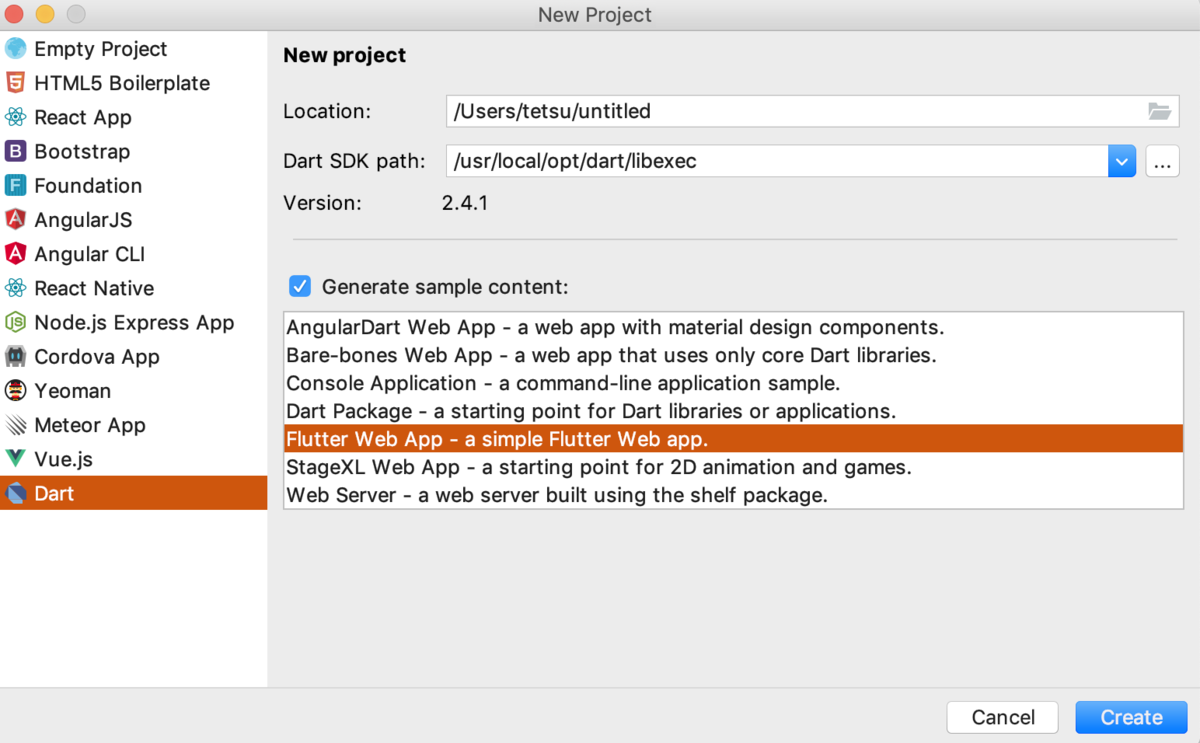
サーバー起動
$ flutter pub global activate webdev
ホットリロードを有効にしてサーバーを起動します
$ webdev serve --hot-reload
Creating build script, took 7010ms
[INFO] Setting up file watchers completed, took 10ms
[INFO] Waiting for all file watchers to be ready completed, took 201ms
[INFO] Building new asset graph completed, took 1.0s
[INFO] Checking for unexpected pre-existing outputs. completed, took 1ms
[INFO] Running build completed, took 25.8s
[INFO] Caching finalized dependency graph completed, took 184ms
[INFO] Succeeded after 26.0s with 571 outputs (3248 actions)
Serving `web` on http://localhost:8080
localhost:8080 でサーバーがたちあがります。ここにブラウザからアクセスすればOKです

トラブルシューティング
$ webdev serve --hot-reload
webdev could not run for this project.
The `build_web_compilers` version – 2.2.3 – is not within the allowed constraint – >=0.3.6 <2.0.0.
エラーに記載のバージョンが同じものを探そうとすると、以下のようなサイト(何語?)を参考にしないといけないあたり、Flutter for webの未熟さ具合が感じられます。
https://www.petanikode.com/flutter-web/
pubspec.yaml を編集します
dev_dependencies:
  build_web_compilers: ^1.0.0
Downloading build_web_compilers 1.2.2. がはいります
iOS simulatorでアクセス
Safariを起動し、普通に検索バーでpasteを使って貼り付けてアクセスします
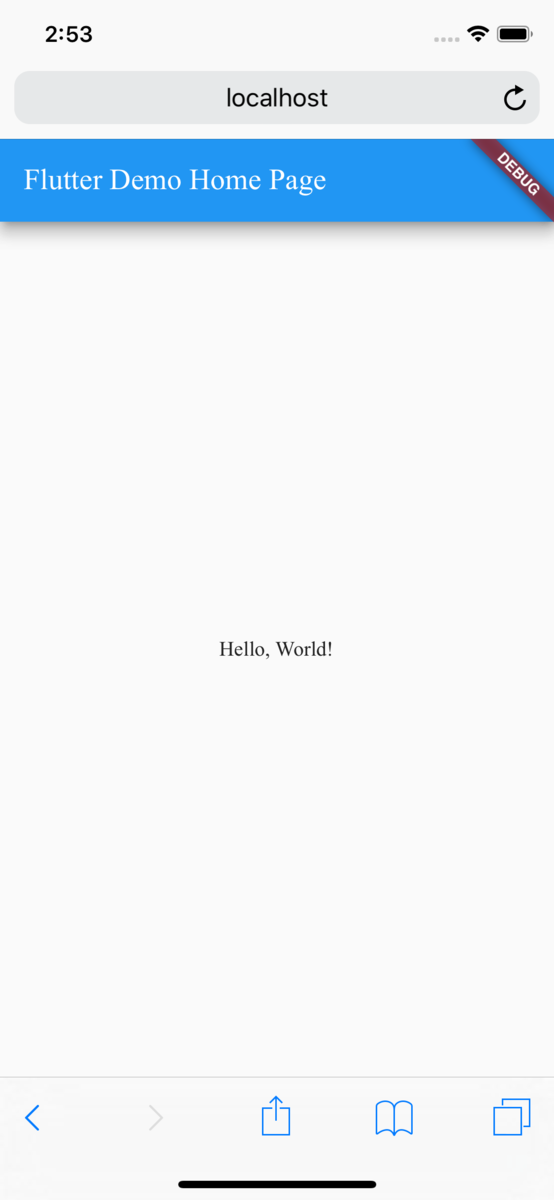
なぜか読み込みが結構遅いです・・
githubpagesで公開
$ webdev build
.gitignoreを修正し、buildをコメントアウトして、buildをコミットします。
そのままコミットしてgithubにpushしましょう
$ git init
$ git add -A
$ git commit -m "init"
$ git remote add origin <githubのリポジトリ>
$ git push -u origin master
githubリポジトリのsettings > github pages で 「Source」のmasterにチェックをいれる
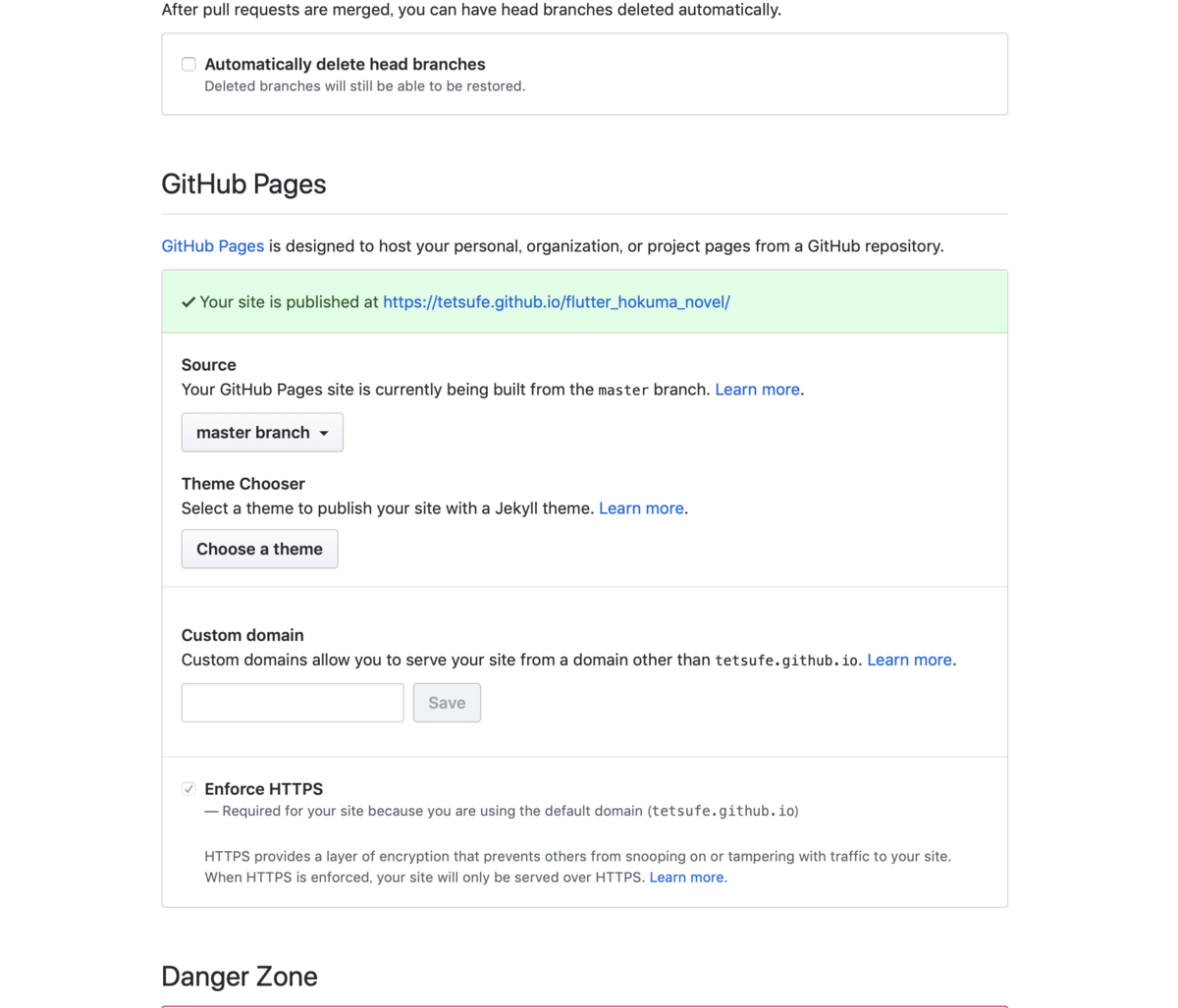
今回は flutter_hokuma_novel というリポジトリ名にしたので、
https://tetsufe.github.io/flutter_hokuma_novel/build/ にアクセスすれば、flutter for webで作ったページが表示されます!(webdev build によって build/ 以下にindex.htmlがあるので、/build/ をURLに含めるのを忘れないようにしましょう。)
(例えば、あなたのユーザ名が xxx で、リポジトリ名が yyy なら、https://xxx.github.io/yyyl/build/ となります。)

